
What you'll learn in this article - How the three cafeteria automated checkout methods (AI image recognition, RFID, and weighing) work - A side-by-side comparison of checkout speed, recognition accuracy, cost, and operational effort - A flowchart to choose the best method for your own cafeteria - A checklist to review before introduction
"The queue at the staff cafeteria register is too long," "We can't secure enough checkout staff," "Checkout errors keep causing complaints" — the fundamental solution to these worries is an automated checkout system.
But "automated checkout" is not just one thing: the methods vary — AI image recognition, RFID, and weighing. How they work, their cost, and the cafeteria types they suit all differ.
In this article we explain how each of the three methods works and cover everything from a comparison table to a selection flowchart and an introduction checklist. Please read to the end as a resource for deciding "which method suits our cafeteria?"
The background behind the growing attention on cafeteria automated checkout
In the settings of mass catering — corporate cafeterias, school lunches, hospital cafeterias, and the like — "manual checkout" was the norm for many years. In recent years, however, the following three changes have accelerated the introduction of automated checkout.
1. The deepening labor shortage
Cafeteria registers require one or two staff per counter. In large cafeterias with many counters, checkout alone costs the labor of several people. On top of that, difficulty in hiring part-time staff and high turnover are compounding the labor shortage.
2. The queue problem at peak times
The peak time for lunch is limited. Because manual checkout takes 30 to 60 seconds per person, cafeterias serving several hundred people can see queues of more than 20 minutes. Having employees' lunch breaks eaten up by "waiting in line" is a significant loss for the company too.
3. The demand for data-driven management and food-loss reduction
With equipment (procurement) that relies on experience and intuition, accurately grasping food loss is difficult. As social interest in SDGs and food-loss reduction rises, a high-accuracy procurement plan based on sales data is increasingly sought. Automated checkout is also a means of naturally building that data foundation.
Cafeteria automated checkout systems — an overview of the three methods
The automated checkout systems currently in practical use in cafeterias can be broadly divided into three.
① AI image recognition method
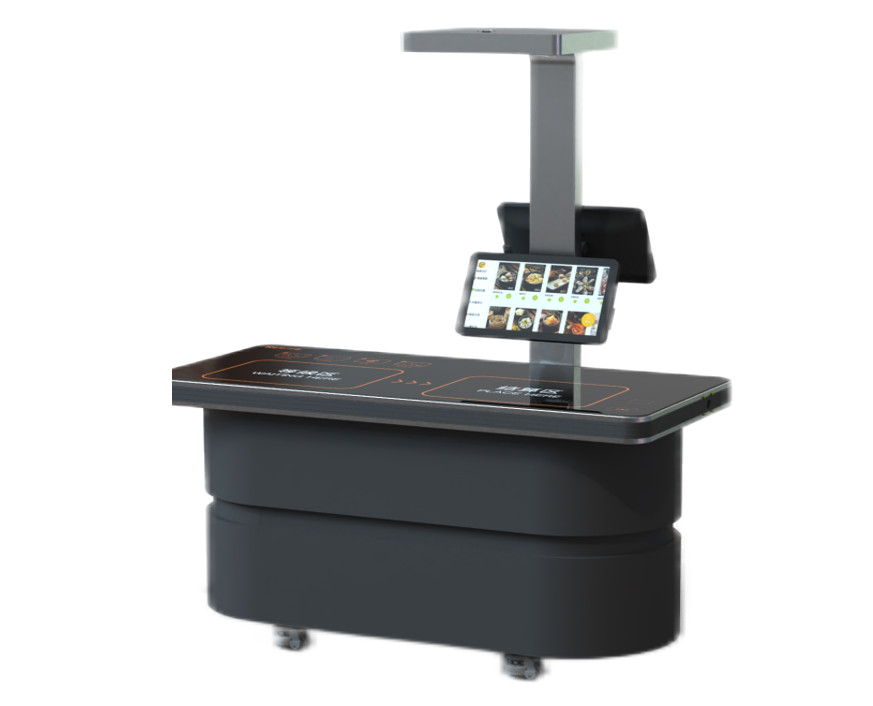
How it works: An AI camera (5 megapixels) on the checkout counter photographs the dishes on the tray → image recognition automatically identifies items and quantities → the amount is calculated instantly
| ✅ | No special dishes needed — with "dish recognition mode" you can introduce it using ordinary tableware as-is |
| ✅ | Menu registration is just a photo — take a picture on the terminal and it learns automatically. Handles daily specials instantly too |
| ✅ | Server-free edge design — the AI engine is built into the checkout counter itself |
| ✅ | Two recognition modes — dish recognition (99.99% accuracy) / food recognition (99% accuracy). In real cafeterias the daily menu is limited to 10–30 items, so in actual operation it is nearly 100% |
🎯 Recommended for: staff cafeterias with a rich variety of daily specials, cafeterias with many items
② RFID method
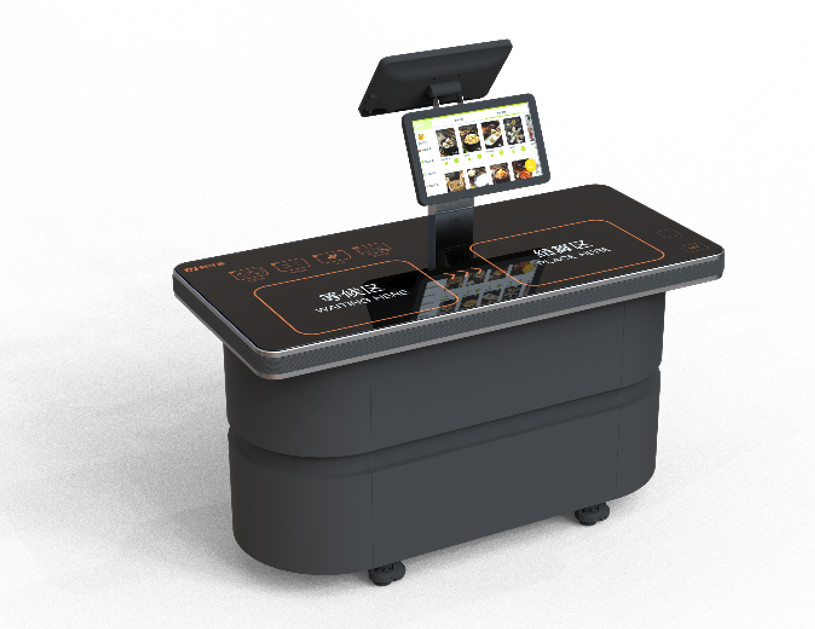
How it works: Menu information is recorded in dishes with a built-in RFID chip → just place them on the checkout counter to read them instantly → the total amount of multiple dishes is calculated automatically
| ⚡ | Fastest reading speed — even about 30 items are recognized together in about 1 second. Nearly 100% accuracy |
| ♻️ | Dishes are reused as-is after washing — the information can be rewritten at any time. It also supports different prices for morning, noon, and night |
| 📦 | Batch rewriting supported — writing menu data to dishes on the dispensing machine finishes in a short time |
| 🔑 | Three payment methods supported — face authentication, QR code, and IC card. An order-correction function is also included |
| ⚠️ | Note — RFID-embedded dishes are required (higher initial cost). Maximum heat resistance of 85°C |
🎯 Recommended for: large cafeterias centered on fixed menus; facilities needing high-frequency use and high-volume processing
③ Weighing method
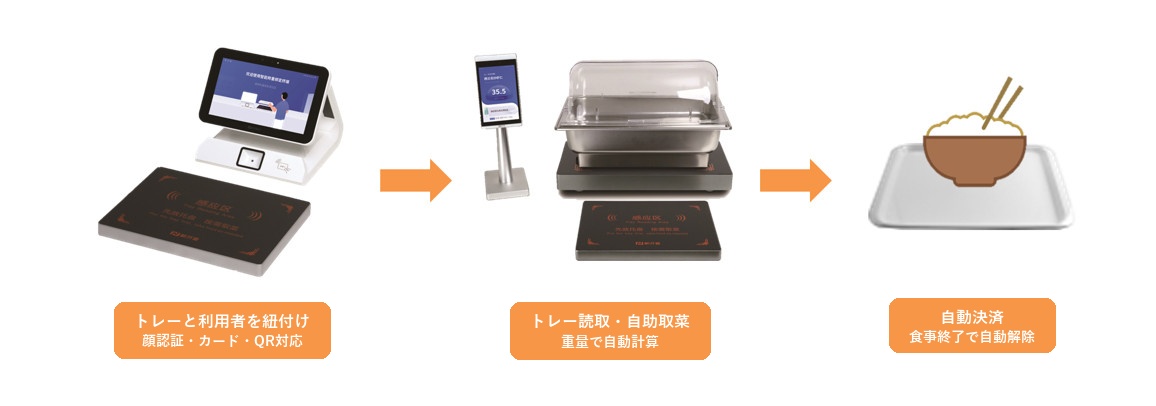
How it works: A tray-binding machine links dishes to a tray → customers serve themselves freely, buffet-style → the weighing checkout counter tallies automatically by the number of grams
| 🍽️ | "Take only what you want to eat" self-service — higher meal satisfaction plus a natural reduction in leftovers |
| ⚖️ | Weighing accuracy is in grams — high-precision weighing combining gravity sensing and chip recognition |
| 💳 | Frictionless payment — supports face authentication, QR, and IC card. No staff intervention needed |
| 🔍 | Food-safety traceability — records the details of the dishes taken. Enables rapid tracing of food-safety issues |
| 📊 | Nutrition data analysis — links consumption data with nutritional content and provides personalized nutrition reports |
🎯 Recommended for: buffet- and cafeteria-style dining halls; facilities that prioritize food-loss reduction
A thorough comparison table of the three methods
| Comparison item | AI image recognition | RFID | Weighing |
|---|---|---|---|
| Recognition method | Camera + AI image recognition | RFID chip reading | Weight sensor + chip |
| Dish constraints | None (food recognition mode) / dedicated dishes (dish recognition mode) | Dedicated RFID-embedded dishes required | Ordinary dishes + dedicated tray |
| Checkout speed | About 1–2 seconds | About 1 second | About 10–15 seconds |
| Recognition accuracy | 99% (food mode) – 99.99% (dish mode) | 99.99% or higher | Weight-based (in grams) |
| Initial cost | Medium (checkout counter only) | Higher (checkout counter + RFID-embedded dishes + dispensing machine) | Medium (checkout counter + tray-binding machine + dedicated tray) |
| Dish heat-resistance limit | None | Maximum 85°C | None |
| Menu-change handling | Just photograph with the camera (same-day support) | Write chips to dishes on the dispensing machine | Update the weight master on the management screen |
| Server required? | Not required (edge type) | Not required | Not required |
| Payment methods | Face authentication, QR, IC card | Face authentication, QR, IC card | Face authentication, QR, IC card |
| Data analysis | ◯ (sales by menu, nutrition analysis) | ◯ (sales by menu, nutrition analysis) | ◎ (consumption in grams + nutrition analysis) |
| Food-loss measures | ◯ (sales data analysis → procurement optimization) | ◯ (sales data analysis → procurement optimization) | ◎ (encourages taking small portions + data analysis) |
| Recommended cafeteria | Cafeterias with a rich variety of daily specials | Large cafeterias centered on fixed menus | Buffet / cafeteria style |
One point: Common to all three methods, from a PC management terminal you can perform menu management, order management, sales reporting, and management analysis. This enables you to break away from handwritten ledgers and Excel management, and becomes the first step toward data-driven cafeteria management.
Method-selection flowchart — determine the best method with three questions
You can determine which method is best for your cafeteria with the following three questions.
Q1. Is it buffet / cafeteria style?
→ Yes → the weighing method is recommended
In buffet style, customers serve themselves freely, so rather than the AI or RFID methods that bill by "item × quantity," the weight-based weighing method fits naturally. Charging by the gram encourages "take only what you want to eat" behavior and directly leads to food-loss reduction.
Q2. Can you switch out the dishes?
→ Yes → the RFID method is recommended
If your environment allows introducing dedicated RFID-embedded dishes, the RFID method with the fastest reading speed is powerful. Especially in large cafeterias centered on fixed menus that process several hundred to several thousand meals a day, its one-second-per-meal high-speed checkout shows its strength.
Q3. Do you have many daily-special menus?
→ Yes → the AI image recognition method is recommended
In cafeterias where items change frequently with daily specials, the RFID method — which rewrites the dish chips every time the menu changes — takes effort. With the AI method you can just photograph the new menu with the camera for same-day support. Since special dishes are not needed either, you can introduce it with almost no change to your existing cafeteria layout.
Still undecided? → We conduct a free PoC (proof of concept) where you can try multiple methods in your actual cafeteria environment. Rather than a desktop comparison alone, judging after experiencing it on-site is the reliable approach.
Management features common to all methods
Regardless of method, automated checkout systems come standard with the following management platform.
🖥 PC management terminal
| Feature | Details |
|---|---|
| Dashboard | Check the day's sales, real-time order information, and sales quantity by menu at a glance |
| Menu management | Register and edit dish categories, items, prices, and images |
| Order management | Detailed search of all orders; detection of and alerts for abnormal orders |
| Sales reports | Sales totals by day, week, month, and meal occasion (morning/noon/evening) |
| Management analysis | Sales ranking by menu, cafeteria usage rate, and average spend trends |
| Device management | Operating status and alert management for each checkout counter |
📱 Mobile integration
- For users: view consumption history, nutrition analysis reports, and balance top-ups
- For administrators: sales flash-report notifications and device alerts
🔒 Security
- Face authentication: equipped with an infrared dual camera. Prevents spoofing with photos or 3D models
- QR code: supports both forward and reverse scanning
- IC card: contactless M1/CPU, ISO/IEC 14443 compliant
A checklist to review before introduction
When considering the introduction of an automated checkout system, organizing the following items in advance makes the process smooth.
| Check item | Confirmation point |
|---|---|
| ☐ Meals per day | Grasp the scale (up to 300 meals / 300–1,000 meals / 1,000+ meals) |
| ☐ Cafeteria format | Set-meal type / buffet type / mixed type |
| ☐ Current layout and traffic flow | Checkout-counter placement space, power supply, and network environment |
| ☐ Frequency of menu changes | Daily / weekly / fixed |
| ☐ Whether dishes can be switched out | Whether switching to dedicated RFID dishes is possible |
| ☐ Budget sense | Checkout equipment only / total cost including dishes |
| ☐ Network environment | Wi-Fi / wired LAN (Ethernet 10/100 Mbps) |
| ☐ Payment method requirements | Face authentication / QR / IC card / multiple support |
How introduction proceeds — 5 steps
| Step | Details |
|---|---|
| STEP 1 | Current-state hearing — grasp the cafeteria's layout, number of meals, and operational challenges |
| STEP 2 | Method proposal — propose the best method (or combination) from the three |
| STEP 3 | Free PoC — install equipment in the actual cafeteria environment and verify the effect |
| STEP 4 | Full introduction — menu registration, AI training, and staff training |
| STEP 5 | Operation start & support — ongoing operational support and proposals for data utilization |
💡 What is a PoC (proof of concept)? It is a scheme in which, before full introduction, we bring equipment into your actual cafeteria and run a test operation. We handle everything from installing to collecting the equipment, and there is no cost at all. You can decide after confirming on-site whether it "really is effective."
Frequently Asked Questions (FAQ)
Q. Does introducing an automated checkout system require major changes to my existing cafeteria layout?
A. No. Any of the methods can be introduced simply by placing the checkout counter in your existing register space. The AI method uses a server-free edge design, so no large-scale network construction is required either.
Q. Can it handle daily-changing menus?
A. Yes. With the AI image recognition method, you can register a new menu just by photographing it on the terminal, and it learns automatically. With the RFID method, menu information is written to the dishes on the dispensing machine. With the weighing method, you update the weight master on the management screen.
Q. What happens if a checkout error occurs?
A. With all methods, orders can be corrected on the checkout screen. The management terminal also has a function to detect and correct abnormal orders.
Q. Please tell me the rough introduction cost.
A. It varies by method, number of units, and cafeteria scale. First, please confirm the actual effect with a free PoC; based on those results we will propose the optimal configuration and cost.
Q. Can multiple methods be combined?
A. Yes. For example, you can combine different methods by area within the cafeteria, such as "AI method for the set-meal corner and weighing method for the salad bar."
Summary — when in doubt, try a PoC first
Cafeteria automated checkout systems come in three methods — AI image recognition, RFID, and weighing — each with its own strengths.
| Method | In a nutshell |
|---|---|
| AI image recognition | Easy to introduce without special dishes. Strong with daily-special menus |
| RFID | Fastest reading speed. Best for fixed menus × large cafeterias |
| Weighing | Best for buffet style. Greatest effect on food-loss reduction |
Which method is best for your own cafeteria is most reliably determined by trying it in the actual environment.
We conduct a free PoC where you can experience all three methods. We handle everything from bringing in and installing to collecting the equipment, and there is no cost at all.
Why not first confirm on-site "which method is effective for our cafeteria?"
📞 Apply for a Free PoC
AI image recognition, RFID, and weighing checkout — test the method best suited to your cafeteria in a real environment.
We handle equipment delivery, installation, and collection. No cost involved.